
Netspark Real-time filter
Internet Safety AppsParenting
3.084.00 Reviews
- Version
- 44.42
- Installs
- 100.00K
- Age Rating
- Everyone
Screenshots
Our Review of Netspark Real-time filter
 Analysis by Appyee
For parents, the hard part of internet safety is rarely deciding that boundaries matter; it is choosing how much to filter without making ordinary browsing a daily argument. Netspark Real-time Filter is a parenting app from Internet Safety Apps that focuses on filtering online material and managing screen time. I see its strongest appeal in households that want a dedicated layer of oversight, rather than relying only on a child’s promise to close an unsuitable page.
Start with the kind of oversight you need
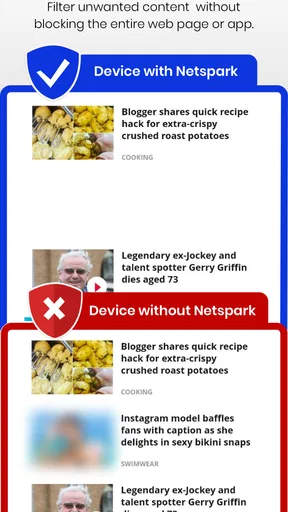
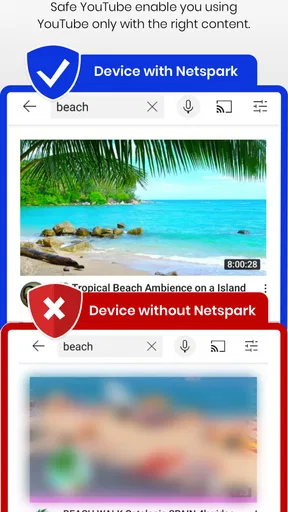
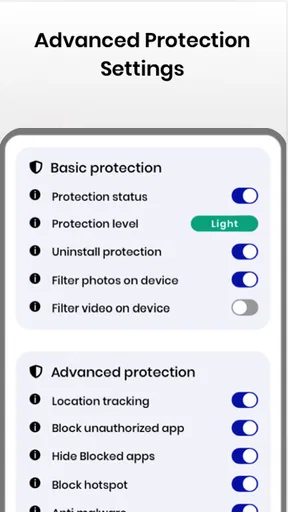
Before installing any parental-control tool, I’d decide what problem I’m trying to solve. Is the main concern unsuitable videos and images, text content, or late-night screen use? Netspark’s emphasis on filtering video, images and text, alongside screen-time management, makes it relevant when a family wants to address more than one of those concerns in one place. It is not a substitute for talking with children about what they see online, but it can support clearer household rules.
I would also think about who will manage the settings and how often they are likely to change. Filtering is most useful when it reflects a child’s age and routines, not when it is set once and forgotten. A parent who wants a quick, low-maintenance switch may prefer the built-in controls already available on a device. Someone who wants a more focused filtering approach may be more comfortable considering a dedicated app like this one.
Getting Started with Netspark Real-time Filter
First off, setting up Netspark Real-time Filter is a breeze. You download it from the app store, and you’re greeted with a user-friendly interface that doesn’t require a PhD in tech to navigate. I was pleasantly surprised to find that the app guides you through the initial setup with clear instructions, making it accessible even for those who aren’t particularly tech-savvy.
Features Galore
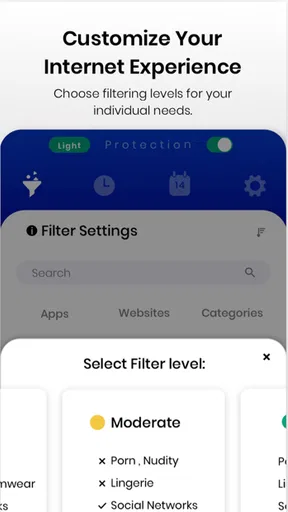
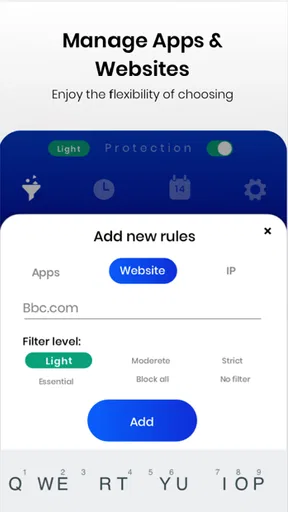
Once you’re in, the app’s rich feature set is immediately apparent. You can customize filters to block specific types of content, which is especially handy if you have kids using the same network. The real-time aspect is impressive; it updates the filters continuously, ensuring that nothing slips through the cracks. It’s like having a vigilant watchdog on duty 24/7.
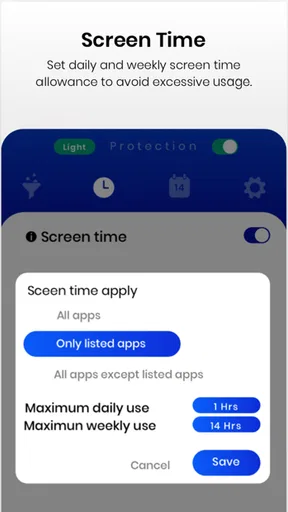
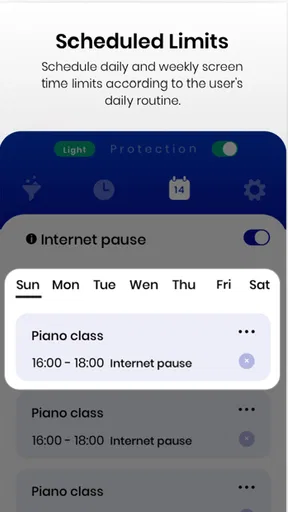
I also appreciated the app’s flexibility. You can set different profiles for different users, meaning you can tailor the internet experience to suit everyone’s needs. It even lets you schedule internet access times, a feature I found particularly useful for managing my kids’ screen time.
Where the filtering approach helps most
The separate-profile idea matters in a shared household because a rule that makes sense for a younger child can feel unnecessarily strict for an older one. I’d start by setting the expectations with each child, then use the profile setup to make those boundaries less blunt. That is more practical than applying one household-wide rule and repeatedly loosening it for one person or tightening it for another.
A realistic use case is a child who uses the same device for homework, casual browsing and videos after school. A parent can think about which categories need tighter limits and when entertainment should give way to bedtime, rather than treating every minute online as equally risky. Scheduling can help make the routine predictable; it works best when the child knows the schedule in advance and understands why it exists. Otherwise, even a sensible limit can feel like an arbitrary lockout.
One useful habit is to review a filter after a child’s routine changes, such as when schoolwork begins requiring new sites or a device starts being used in a different room. If a page needed for a legitimate task is blocked, the whitelist option can resolve that specific snag. I would keep such exceptions narrow: approving one trusted page is a better response than weakening a broader filter just to get past a single false alarm.
Performance and Usability
Now, let’s talk about performance. The app runs smoothly without causing any noticeable lag in internet speed. I’ve tried a few other filtering apps before, and some of them slowed my device down considerably, but that wasn’t the case here. The app’s efficiency is a big win in my book.
Usability-wise, the app is quite intuitive. The dashboard is well-organized, and everything is accessible within a few taps. It’s clear that the developers put a lot of thought into making this app as user-friendly as possible.
How it compares with built-in controls
The usual alternatives fall into two broad groups: parental controls included with a phone or operating system, and dedicated filtering apps. Built-in controls can be a sensible first step if a family mainly wants basic device limits and prefers not to add another service to manage. Netspark is more compelling when the priority is filtering different kinds of online content as well as setting screen-time boundaries. The trade-off is that a dedicated tool adds another set of settings for a parent to understand and maintain.
I would not choose a filtering app as the only answer to every online-safety concern. No filter can replace age-appropriate conversations, and a child may encounter material through sources that do not behave like ordinary web pages. For a family whose main concern is helping a child build judgment, discussion and agreed rules may matter more than adding stricter blocking. For a household that wants a practical extra layer, filtering can still be useful without being treated as foolproof.
Security and Privacy
When it comes to security, Netspark Real-time Filter doesn’t disappoint. It uses advanced encryption to ensure that your data remains private. I felt reassured knowing that my information was secure and not being shared with third parties. In today’s world, where privacy is a huge concern, this feature is invaluable.
Because parental tools can affect a child’s access to everyday services, I’d make privacy and trust part of the family conversation, not just a parent-only decision. Explain that filtering is there to support agreed boundaries, rather than to secretly monitor every choice. That approach does not change how the app works, but it can make its use feel fairer and reduce the chance that a child sees it as punishment.
Some Quirks
Of course, no app is perfect. While I found the customization options to be generally excellent, there were a couple of times when legitimate sites were incorrectly flagged. Fortunately, the app allows you to quickly whitelist these sites, but it’s something to be aware of. It didn’t happen often, but it’s worth mentioning.
That occasional misclassification is a real cost of filtering: a child may hit a block while trying to reach something harmless, and the parent then has to decide whether to investigate, allow an exception or keep the restriction. I’d treat a block as a prompt to check the context, not proof that a page is dangerous. Keeping a calm process for reviewing blocked pages makes the tool less frustrating and helps avoid turning every interruption into a dispute.
Plan for the practical changeover
Switching to a dedicated parental-control app takes more than installing it. A parent needs to choose sensible boundaries, explain them, and be ready to adjust them when a school task or normal activity runs into a block. If several people share devices, it is worth deciding who will manage settings and how children can ask for a site to be reviewed. That small bit of planning can prevent a useful filter from becoming a source of repeated last-minute troubleshooting.
The app is free to install, with in-app purchases ranging from $0.99 to $149.99 per item, so I would check the purchase options and decide what the household actually needs before committing to anything. It is rated for Everyone, has an average rating of 3.0 from around 5,400 ratings, and has been installed over 100,000 times. Those figures give a sense of its public reception, but they do not tell me whether its approach will match a particular family’s needs.
It was released on July 26, 2016, and its current version is 44.31, with Android 7.0 as the minimum operating-system requirement. Those details are useful when checking an older device before setup. If the child mainly uses an iPhone or another platform, I would confirm that the version available for that device suits the family’s needs rather than assuming that every feature or setup step works identically across platforms.
Final Thoughts
Overall, I’m impressed with Netspark Real-time Filter. It’s a robust solution for anyone looking to control the content accessed on their network. Whether you're a parent wanting to protect your children from inappropriate content or someone who just wants a more controlled internet experience, this app is worth considering.
The combination of real-time filtering, ease of use, and strong security features makes it a standout option. In a world where online threats are ever-present, having a tool like this feels like a necessity. So, if you’re ready to bring some order to your digital life, give Netspark a try. You might just find it’s exactly what you’ve been looking for.
Who I’d recommend it to
I’d shortlist it for parents who want content filtering and screen-time rules in the same parenting tool, especially when different children need different boundaries. It may also suit a caregiver who prefers a dedicated dashboard over piecing together several separate device settings. The app is less suitable for someone who wants a completely hands-off setup, or for a family that is uncomfortable with filtering as a way to guide browsing. In those cases, built-in device controls, simpler household rules or a conversation-led approach may be a better fit.
My recommendation is to treat it as a practical layer, not a guarantee. Start with a small set of rules that match a real concern, tell your child what those rules are, and check how they affect ordinary activities before adding more restrictions. If the app’s filtering and scheduling fit your family’s routine, its focused approach can make parental oversight more manageable. If the extra settings or occasional blocked page create more friction than reassurance, a simpler option may serve you better.
Verdict
Strengths of Netspark Real-time filter
- Effective real-time content filtering.
- Customizable parental controls.
- Cross-platform compatibility.
- User-friendly interface.
- Regular updates for new threats.
Limitations of Netspark Real-time filter
- May slow down device performance.
- Limited free version features.
- Requires stable internet connection.
- Initial setup can be complex.
- Some websites might be misclassified.
Similar Picks in This Category
View All
Family Space
Motorola Mobility LLC.3.9

شرطة الأطفال - مكالمة وهمية
Oub Apps4.1

Findmykids: Parental Control
LETEM LTD4.6

Pregnancy + | Tracker App
Philips Electronics UK Limited4.8

Policía de niños - para padres
Kids police4.7

Pregnancy App
Amila4.9
Frequently Asked Questions
What is Netspark Real-time Filter and how does it work?
Netspark Real-time Filter is a comprehensive content filtering application designed to monitor and control internet usage. It uses advanced algorithms to filter inappropriate content across various platforms in real-time. By analyzing web pages and online activities, it ensures a safer browsing experience, especially for families and educational institutions.
Is Netspark Real-time Filter compatible with all devices?
The application is compatible with both Android and iOS devices, making it versatile for use across different operating systems. It supports a wide range of devices, ensuring that users can implement content filtering solutions on their smartphones, tablets, and even some desktop environments, depending on additional configurations.
How does Netspark Real-time Filter ensure privacy and data security?
Netspark takes user privacy and data security seriously. It employs encryption and secure protocols to ensure that user data is protected while using the app. The filtering processes happen locally on the device, minimizing data transmission and enhancing privacy by not storing personal browsing information on external servers.
Can I customize the filtering settings in Netspark Real-time Filter?
Yes, Netspark Real-time Filter offers customizable settings that allow users to tailor the level of filtering to their specific needs. Parents can adjust the settings to block specific types of content, set time restrictions, and create user profiles with different access levels, providing flexibility and control over internet usage.
Does Netspark Real-time Filter affect internet speed or device performance?
The app is designed to operate efficiently without significantly impacting internet speed or device performance. While it runs continuously in the background, it uses optimized algorithms to ensure that filtering processes are swift and do not interfere with the overall functionality of the device, providing a seamless user experience.
